Case Study / 04 — 0 to 1 AI Product

Chronicle

Surgical videos are recorded by default — yet surgeons still write notes from memory, days later. I led design for a founder with a patent-pending algorithm, taking the product from zero to investor-ready: research, IA, interaction design, and a full engineer handoff.

Client UW Dept. of Otolaryngology
My Role Design Lead
Supporting Research
Design Team Designer, PM, User Research
Deliverables 0→1 product
Investor-ready prototype for patent pending algorithm
🏆
Brave Award — Innovation in AI

Recognized for innovation in AI product design — the only team to build user autonomy and AI transparency as core product principles, not afterthoughts.

A solution looking
for a problem.

Dr. Lingga Adidharma had a patent-pending AI algorithm that could compress six-hour surgeries into 15-minute highlight reels — and needed a design team to make it a product. After our first meeting, I was direct: this was a solution looking for a validated problem. I stepped back before touching wireframes to confirm the problem and the user. That reframe shaped everything.

"How might digital imagery improve surgeons' recall, collaboration, and time in order to improve patient outcomes?"

— Our design question
6h
Raw surgery video
15m
AI highlight reel
84%
Algorithm accuracy
0
Existing UI

Before we designed anything,
we went to the OR.

01

Desk research + regulatory mapping

Literature review, legal scan across HIPAA and patient privacy, competitive benchmark. Technical and regulatory landscape established before speaking to anyone.

02

Field visit at Harborview Hospital

On-site at Harborview Medical Center. I shadowed Dr. Adidharma through handoffs and consultations to understand the full workflow — not just the documentation moment.

03

Surgeon interviews

1:1 sessions with experienced surgeons. I focused on note-taking habits, memory under pressure, and use of digital imagery. Each conversation sharpened where the real friction lived.

"I don't have time to be Ernest Hemingway here."

— Experienced surgeon, in-depth interview

Four compounding pain points.

Time vs. accuracy

Notes are a compromise

Patient care always interrupts documentation. Notes are finished later, from memory.

Subjectivity

Language fails where images don't

"Airway dilated to 2mm" means something different to every reader. A picture of an almost-closed airway doesn't.

Imagery gap

Missing visuals cause repeated procedures

Without video, patients undergo repeated scans. Urgency gets lost in text.

Memory

Notes written days later

Operative notes written days later. Multiple similar surgeries in one day blur together.

"Reading 'the airway is dilated to 2 millimeters' is a lot harder to understand than a picture of the airway almost closed."

— Surgery resident, Harborview field visit

Five principles to keep us honest.

Before writing a single principle, I brought in Josh Lovejoy — who invented LLM-powered personalization at Google Shopping — to pressure-test our AI assumptions. His critique sharpened what "surgeon autonomy" actually means in practice and kept our principles from being aspirational window dressing.

Efficient + integrated

Fit existing workflows. Key tasks in minutes, not hours.

Surgeon-centric

Surgeons in the room at every iteration. Comfort with AI varies — design for the full spectrum.

Utility over aesthetics

Function over form. Every feature earns its place clinically.

Practical first

Ship something credible. Leave a clear roadmap, not speculative features.

Don't put AI on a pedestal

Surgeons approve everything. Their corrections train the model. Blind trust is dangerous — structured disagreement is a feature.

End-to-end mapped.
Focused where it mattered most.

I mapped the full system, then scoped to the three moments where surgeon judgment is most active:

Upload video Generate highlight reel Review clips Select + bookmark Tag + publish Share + store DESIGN FOCUS

Research to requirements
to engineer handoff.

My process moved from low-fidelity sketches and storyboards, through three rounds of wireframes and mid-fidelity prototypes, to a fully annotated engineer handoff. Each round was grounded in surgeon feedback — and one concept was killed before it could become a liability. Honest scoping meant shipping something credible over something ambitious.

R1

Lo-fi sketches + storyboards

Parallel sketches from multiple team members to surface conflicting assumptions early. AI-generated storyboard panels for two scenarios: post-op notes and care team handoff.

R2

First wireframes — structure before style

Three structural variants tested. I pushed for split-panel based on direct feedback from Dr. Adidharma: "viewing text and video together keeps me organized."

R3

Mid-fidelity — validating the AI touchpoints

Introduced a star/person icon system to distinguish AI vs. surgeon-generated tags. Testing revealed the icons weren't landing — surgeons ignored them. We removed them entirely and redesigned around color and explicit labels. The principle survived; the execution changed.

R4

Evaluative testing — AI Trust Score

Measured with the AI Trust Score: understand (Good), efficiency (Okay), control (Bad). The control gap drove R5.

AI Trust Score — Evaluative Testing Results
I understand how and when to use Chronicle.
Chronicle will help me do my job more efficiently and effectively.
I have control using Chronicle.
Good
Okay
Bad

Confusion over right-rail affordances, unclear clip states, AI decisions not reversible enough. Every R5 change addressed one of those three.

R5

High-fidelity + engineer handoff

Final design system delivered with component annotations, interaction specs, and a full engineer handoff package. Every element traces back to a research finding. The relationship with Dr. Adidharma continues as the algorithm moves toward patent.

Wireframe to interaction —
how the clip timeline evolved.

Before high-fidelity, we validated the core mechanic: a vertical timeline linking clip moments to a video player. Each node maps to a specific surgical timestamp. Clicking a node or a clip card syncs both the playhead and the thumbnail — keeping video and annotation in lockstep.

"Viewing text and video together keeps me organized."

— Dr. Adidharma, mid-fi feedback session

Design decision

Our client loved this concept — but we scrapped it. A limited development timeline made it unrealistic to build. Honest scoping meant shipping something credible over something ambitious. That decision freed us to go deeper on what remained.

Draft in Progress
Save edits
Publish
Patient: LongFirstName LongLastName
Surgery: Surgical procedure name
Surgeon: FirstName LastName
▶
Clip 1 · 00:00
00:0000:0015:40
Approach
Removal
Closure
Bookmarked clips

Click a timeline node or a clip card to sync the video player & thumbnail. This concept was scrapped due to restrictions in development timeline.

Scoping down to four key surfaces.

With the timeline concept set aside, we focused on the surfaces that mattered most. The mid-fidelity mockup below shows how we restructured the interface around four key task areas — video viewing, clip annotation review, operative note editing, and publishing.

Third and fourth-round mid-fidelity iterations showing video viewing, clip annotation review, and operative note editing
Mid-fidelity iterations 3 & 4 — continued exploration of how to organize key task areas: video viewing, clip annotation review, and operative note editing.
Core interaction

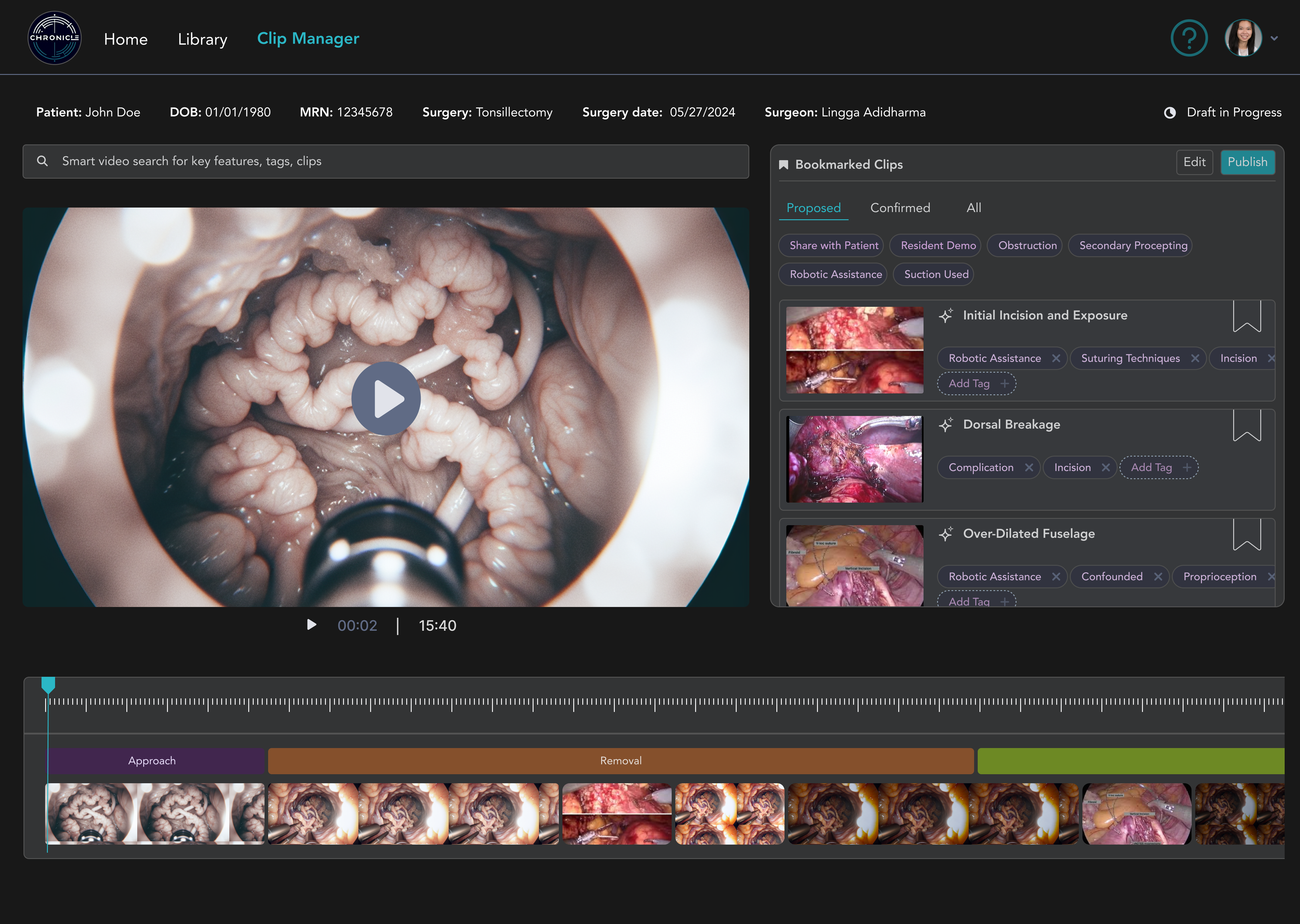
Clip Manager: the surgical command center

The primary workspace pairs the AI highlight reel with a structured clip list, color-coded by surgical phase. Split-panel driven by sponsor feedback: "text and video together keeps me organized." Draft status always visible. One-click publish.

Chronicle Home Library Clip Manager Patient: John Doe Surgery: Tonsillectomy Date: 05/27/2024 Draft in Progress Smart video search for key features, tags, clips 00:02 15:40 Bookmarked Clips Publish Proposed Confirmed All Initial Incision ✦ Robotic Assist ✦ Incision Dorsal Breakage ✦ Complication ✦ Incision Over-Dilated Fuselage ✦ Confounded ✦ Proprioception
AI transparency

Tags: structured, but flexible

Tags serve two functions: searchability and training signal. ✦ marks AI-generated tags; surgeon edits and additions feed back into the model. Every correction makes the algorithm more accurate. Unlabelled AI output eroded confidence in testing — explicit attribution restored it.

Live interaction — try it
✦ Initial incision and exposure
Robotic Assistance ✕ Suturing Techniques ✕ Incision ✕ + Add tag
✦ Over-dilated fuselage
Confounded ✕ Proprioception ✕ + Add tag

Spring physics
Stiffness 280
Damping 26
Duration 240ms
Spring (crafted)
Instant
Linear
Responsible AI

Publish modal: the surgeon stays in control

Before any AI-generated content reaches the patient record, the surgeon must actively confirm review. A design principle from week one — not an afterthought. No passive defaults. The surgeon is the author.

You are using AI Generated Content × Our AI has generated titles and tags for key moments in your video. AI can make mistakes — review carefully before publishing. By clicking continue, you acknowledge use of AI-generated content and have validated all bookmarked clips and tags. Highlight Reel (15:42) Bookmarked Clips (3 clips, 8 tags) ✦ Initial Incision and Exposure ← Back Continue →

We treated ethics as a design constraint,
not a disclaimer.

AI transparency

Every AI touch is labeled

✦ marks every AI-generated clip and tag. No ambiguity about what the machine produced.

Surgeon autonomy

The surgeon approves everything

Active confirmation required before anything AI-generated reaches the patient record.

Error awareness

Omission is a risk we named

The highlight reel is a supplement, not a substitute. Designed to resist over-reliance.

Privacy

HIPAA scoped to sponsor

HIPAA compliance scoped to the sponsor. We designed around that boundary clearly.

Designed for surgeons
under pressure.

Inclusive design in a surgical context isn't about edge cases — it's about the baseline. Surgeons using Chronicle are time-pressured, context-switching constantly, and making decisions where mistakes have consequences. Every core interaction was designed with that stress state in mind.

Cognitive load

Split-panel reduces context-switching

Video and clip list side-by-side so surgeons never lose their place. Switching between screens in a post-op review compounds mental fatigue — keeping both in view was a deliberate decision, not a layout choice.

Scannability

Tabs designed for quick orientation

Proposed / Confirmed / All gives surgeons an immediate read on what needs attention without parsing a list. The information hierarchy was built around a surgeon who has three minutes, not thirty.

Intentional friction

The publish modal slows the right moment

Before sharing a highlight reel, surgeons see exactly what they're publishing and confirm review. The friction is the feature — a time-pressured surgeon needs one moment of deliberate pause before AI-generated content leaves the system. EMR integration is scoped to a future sprint; right now the goal is making the highlight reel usable and shareable on its own terms.

Handoff

The final design was far simplier that the concept I wanted to build and got client buy-in on however, the simpler approach was the right decision given the timeline and engineering power available to actually ship it. By scoping down, the team was able to see it through.

I owned all designs and was lauded for my visual taste. Though real client work, this project was submitted for our master's degree capstone and won the capstone award.

From raw algorithm to
investor-ready product.

Zero to investor-ready in six months. Dr. Adidharma used the prototype in UW stakeholder and investor presentations. The design made the algorithm pitchable. The AI Trust Score defined readiness — and the control gap became the brief for the next sprint.

84%
Algorithm accuracy at handoff
1st
Brave Award — Innovation in AI
3/3
AI Trust dimensions measured
0→1
Research to engineer handoff

What we left on the table (intentionally).

What leading this project
taught me about AI product design.

A solution isn't a product

Refusing to build before validating the problem was the most valuable thing we did. The cart-before-the-horse moment was the brief, not a blocker.

Ethics in the interaction, not the appendix

Week-two principles became actual UI elements. The publish modal, tag system, and AI disclaimers aren't features — they're the ethics made visible.

Research in high-stakes domains is irreplaceable

No secondary research would have surfaced "I don't have time to be Hemingway here." That line came from being in the hospital.

The founder was also the user

Dr. Adidharma was user, domain expert, and critic simultaneously. Weekly syncs kept us honest. Leaning into that dynamic — not just presenting to her — made every iteration sharper.

Scope is a product skill

Scoping the MVP to the clinical workflow, not every possible feature, wasn't a retreat — it was the right pitch for investors at the pre-startup stage. Knowing what to leave out is as important as knowing what to build.

AI as a design tool, not just a subject

I used AI to generate storyboard visuals and accelerate iteration — while being explicit about where human review was non-negotiable. The tool and the product shared the same principle.

"Having objective information is much more helpful than subjective information."

— Experienced surgeon, in-depth interview. The sentence that grounded the entire product.